
Easy PDF Creator
3.00 Build 1205
Size: 1.73 MB
Downloads: 4462
Platform: Win98,WinME,WinNT 4.x,WinXP,Windows2000

Nowadays, PDF files are extremely popular. Every product documentation comes in PDF format and that's because it's easy to read, has a small file size, cannot be modified or altered and best of all, requires only a small application for viewing it. Thus, Adobe has released an application named Reader, that can open PDF files. Unfortunately, when we are talking about creating or modifying PDF files, things get complicated. Programs that allow the creation of PDF files are generally few and also expensive. An example would be Adobe Acrobat, which is the most known software that can manipulate PDF files, but, in spite of this, it has its draw backs. It's expensive, it requires a lot of system resources and it's very difficult to use by a beginner. Another choice for creating PDF files is Easy PDF Creator. It's basically a virtual PDF printer, meaning that PDF files can be created from virtually any application that supports printing.
The programs doesn't require much effort from the user in order to install, as the entire operation is point and click. It can be installed on any version of Windows and the system requirements couldn't be lower.
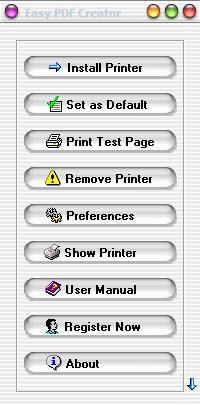
Running Easy PDF Creator will display a small menu with intuitive commands, where the user can install or uninstall the virtual PDF printer, he can configure certain aspects of the printer, can print a test page for verifying that PDFs are created properly. That's pretty much all about the software.
At this point, the user just has to print the desired document as usual, but should select the Easy PDF Creator printer instead of the default one. At the end of the process, he will get a PDF file that resembles perfectly the original document.
Using the preferences section, the user can add some information to the created PDF document, like the name of the author, the version of the PDF file and can also encrypt it using a password.
Easy PDF Creator does not only offer a quick way to create PDF files from any application, it also features various options for converting different types of files into the PDF format and also converting PDFs back to text documents. Users who have a lot of documents that need converting into PDF can use the batch converter, which will processes all the files at once, helping the user save time and effort.
Pros
It allows the creation of PDF files from virtually any application that supports printing. Also, the PDF creation process is extremely fast.

Cons
The lack of complex features may be disturbing for an advanced user. Easy PDF Creator is a great program for creating PDF documents from any application.

Easy PDF Creator
3.00 Build 1205
Download
Easy PDF Creator Awards

Easy PDF Creator Editor’s Review Rating
Easy PDF Creator has been reviewed by Jerome Johnston on 20 Dec 2011. Based on the user interface, features and complexity, Findmysoft has rated Easy PDF Creator 5 out of 5 stars, naming it Essential







